How to Prepare a Sanitized CSAM Report (UPDATED August 2022)

Learn how to easily remove CSAM images and other properties from view
One of the most important factors in a child exploitation investigation, is having the ability to show a report to a colleague, co-worker, prosecutor, or present to present your findings in court without re-victimizing the subject of the photo, or shocking the sense of the viewer of the report. Having a professional report that still reflects the properties that need to be presented is essential to your case.
There are many properties that are presented to the user that not only tell the story but also assist the investigator or examiner as they put the case together to share details from a forensic perspective. Not all properties need to be shown in a finished forensic report, and certainly not the inappropriate exploitation images, however the report still has to be complete and ready and supportive of the testimony you may have to provide in court.
To make a report more palatable, or to sanitize it, investigators must remove images to not only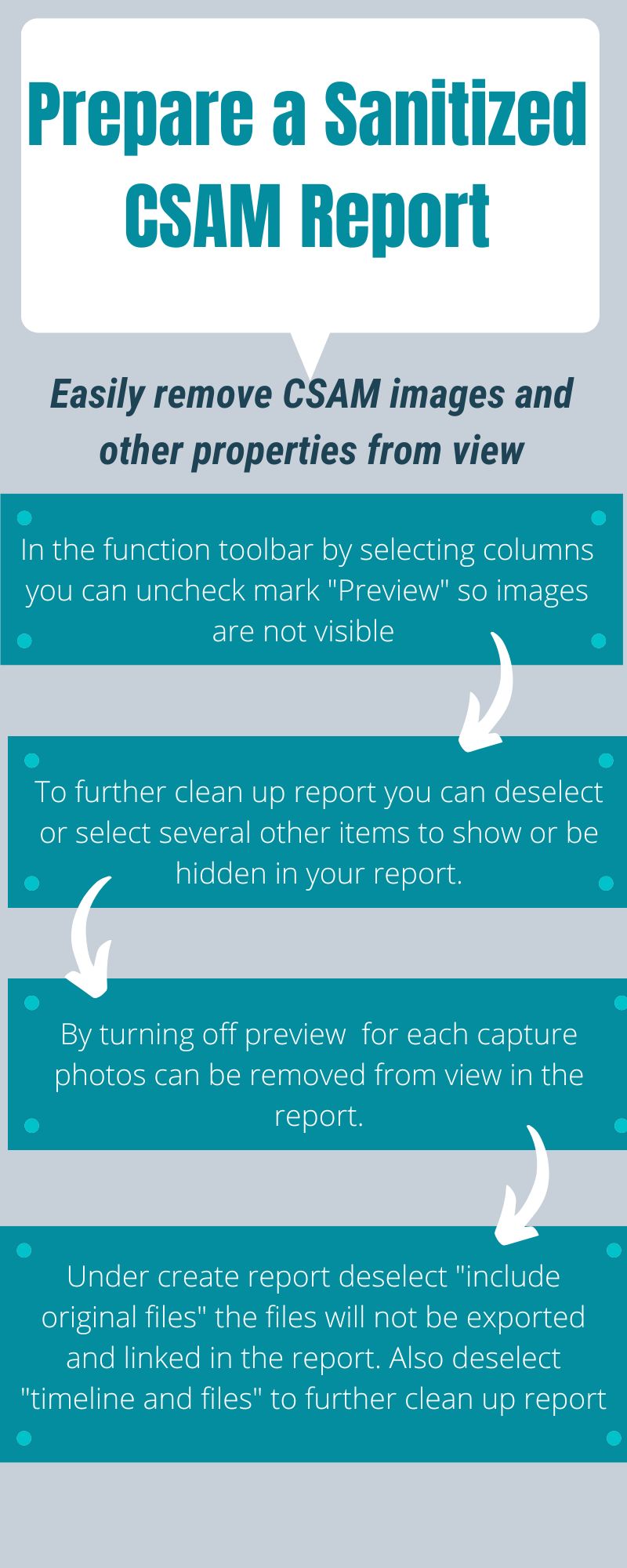 appeal to prurient interests but also those that are patently offensive. To sanitize a report, “to make clean and hygienic, disinfect”, investigators must remove all images. With all of the ADF digital forensic products, this process starts within the analysis portion of our tools, while you are reviewing your scan results.
A clean workspace is essential in any job or location, even in your examination tools. With a few mouse clicks as you progress through your case, you can not only clean up your table view, you can also sanitize the report as you continue your examination.
When you are done with the examination and it comes time to prepare your report, with a few clicks, you will have a clean, accurate, and professional looking report. Cases involving CSAM and CEM can be very emotionally charged so let the facts of the case speak instead of the content subject matter.
Learn More: Solving Crimes Against Children
You might also like to learn how to add Project VIC hashes to a Search Profile.